
Smart Charger for a Cheap Night Tariff: What to Check Before You Buy
The Short Answer
Check four things before you buy: the charger names your tariff, it can get online where it will be fitted, you can see what it is doing, and it suits everyone who uses it. The Ohme Home Pro and the Hypervolt Home 3 Pro both list Octopus Intelligent Go, and both are 7.4kW single phase chargers. The Ohme suits a driver who wants to read the charging status on the unit with no Wi-Fi involved. The Hypervolt suits a household that wants app control for several people or a wired Ethernet connection.

Why the Charger Has to Talk to the Tariff
A night tariff gives you cheaper electricity at set times. Your car only benefits if it draws power in those hours. A basic charger starts when you plug in, so a car you plug in as you get home in the evening charges straight away at the normal rate.
A smart charger holds the session back and starts it when the cheaper rate begins. With a tariff like Intelligent Octopus Go, the charger also has to work with the tariff itself. The Ohme Home Pro integrates with smart electricity tariffs to optimise charging times and costs automatically. The Ohme Home Pro review covers how that works day to day.
Check 1: Does the Charger Name Your Tariff?
Look for your tariff by its exact name on the charger's compatibility list. Intelligent Octopus Go, Octopus Go and Octopus Agile are separate tariffs, so a general line about "Octopus" is not enough.
The Ohme Home Pro lists Octopus Intelligent Go, Octopus Go, Octopus Agile and British Gas Electric Driver. The Hypervolt Home 3 Pro lists those and also OVO Charge Anytime and E.ON Drive. If you are moving to OVO or E.ON, that wider list is worth a look. If you are choosing between Octopus tariffs, both chargers cover the three you are likely to compare.
Check 2: How Does the Charger Get Online?
A smart charger that loses its connection cannot follow the tariff, so think about where it will hang. A charger on a garage wall or the side of the house can sit a long way from your router.
The Ohme Home Pro has a built-in 3G/4G SIM, so it needs no Wi-Fi. That helps when the router signal does not reach the drive. The Hypervolt Home 3 Pro connects by Wi-Fi 2.4GHz or Ethernet. Ethernet suits a charger fitted close to the router or where a cable run is easy. If you rely on Wi-Fi, test your router signal at the exact spot where the charger will go, using a phone on the 2.4GHz network.
Check 3: App, Screen or Both?
You will open the app to set up a schedule. After that, the question is what you want to see on a normal evening. Do you want to walk out to the car, glance at the charger and know it is running?
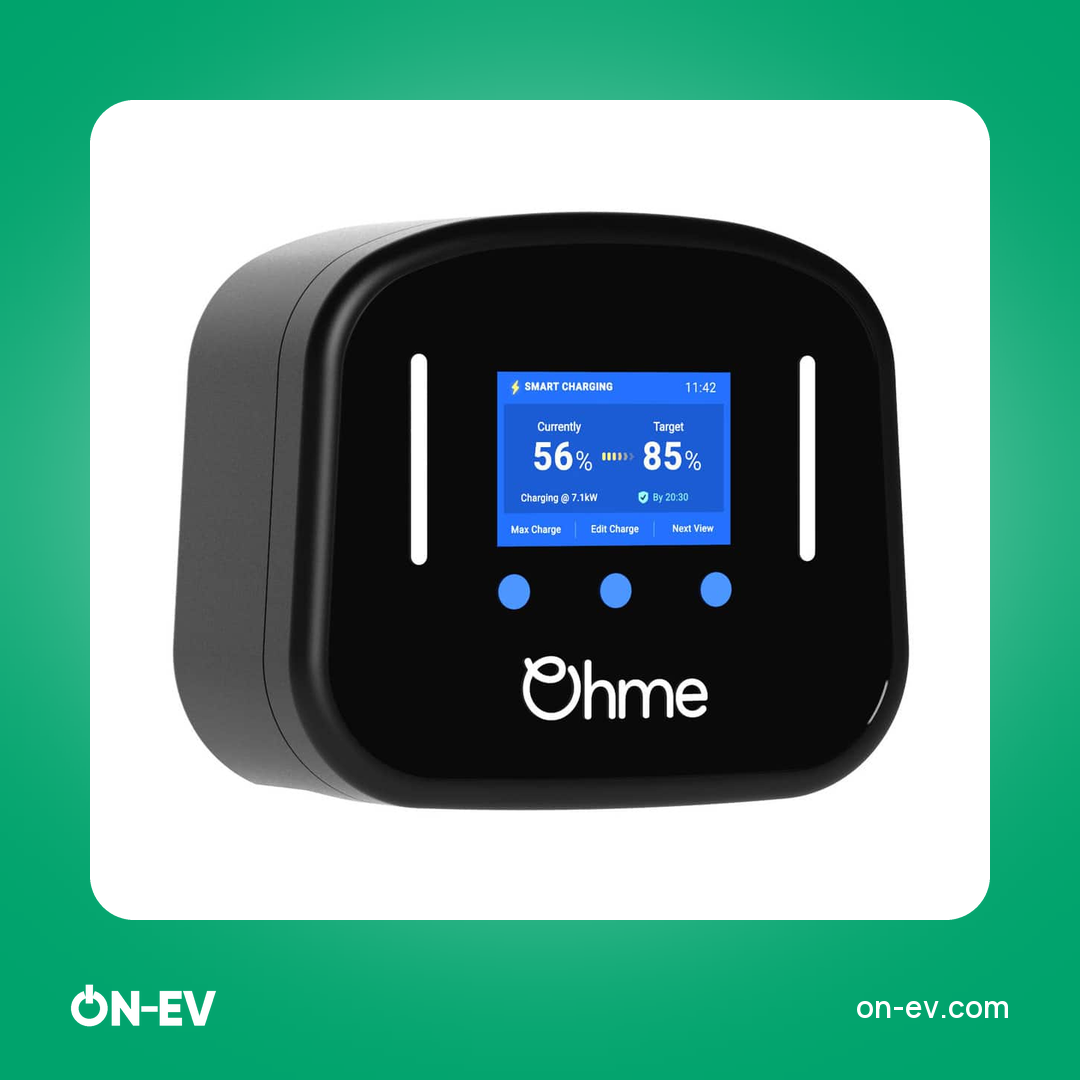
The Ohme Home Pro has a built-in LCD screen, so you can check status without your phone.

The Hypervolt Home 3 Pro has an integrated LED status ring, and the Hypervolt Cloud app handles scheduling, energy tracking and multi-user access. The multi-user access matters if two people in the house drive the same car or share the charger. Each can set and check a charge without borrowing the other's phone.

The Two Chargers Side by Side

| Check | Ohme Home Pro | Hypervolt Home 3 Pro |
|---|---|---|
| Tariffs named | Octopus Intelligent Go, Octopus Go, Octopus Agile, British Gas Electric Driver | Octopus Intelligent Go, Octopus Go, Octopus Agile, OVO Charge Anytime, E.ON Drive, British Gas Electric Driver |
| Connection | Built-in 3G/4G SIM, no Wi-Fi required | Wi-Fi 2.4GHz and Ethernet |
| At the charger | Built-in LCD screen | Integrated LED status ring |
| Output | 7.4kW / 32A single phase | 7.4kW / 32A single phase |
| Price from | £532.00 for 5m | £624.00 for 5m |
Ohme Home Pro EV Charger
Hypervolt Home 3 Pro EV Charger
Which One Fits Your Home
Choose the Ohme Home Pro if the router is far from the charger, or if you want to see the status on the unit without opening an app. Choose the Hypervolt Home 3 Pro if you are on OVO or E.ON, if you can use Ethernet, or if two drivers share the charger.
Solar is a separate question. The Ohme Home Pro has a Solar Boost mode with a CT clamp, and the Hypervolt Home 3 Pro has three solar charging modes. We compare the two in more detail in Hypervolt Home 3 Pro vs Ohme Home Pro, and our home charger buying guide covers the wider checklist. If you want to read the Hypervolt in depth first, see the Hypervolt Home 3 Pro review.
Frequently Asked Questions
Do I need a smart charger for an off-peak tariff?
You need a way to start charging in the cheap hours. A smart charger does that by schedule or by following the tariff, so you do not have to plug in at the right moment each night.
Does the charger need my home Wi-Fi?
The Ohme Home Pro has a built-in 3G/4G SIM and needs no Wi-Fi. The Hypervolt Home 3 Pro connects by Wi-Fi 2.4GHz or Ethernet.
Which charger suits two drivers in one house?
The Hypervolt Home 3 Pro suits this well, because its app offers multi-user access along with scheduling and energy tracking.